


Reviewing Premium Differences

Jan 09, 2026
 85
85
Occasionally, users may notice a difference in premium amounts between the quoted and bound versions of a policy. These discrepancies are often due to a few common factors, which are outlined in the checklist below.
✅ Premium Difference Checklist
Please carefully review the following items, as most premium differences can be attributed to one or more of these:
1. Applied Credits
- If you are applying any of the following credits:
- Loss Free-GL
- Loss Free-Property
- Package Credit
- Ensure the corresponding checkboxes are selected.
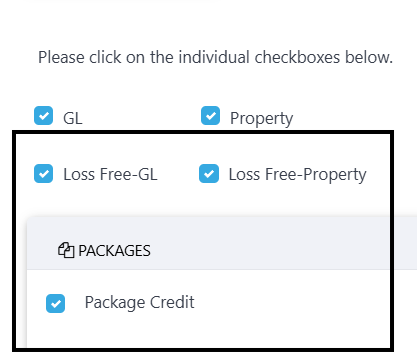
- We recommend reselecting the applicable credit box and then regenerating coverage details to confirm the credit is properly applied.
2. Coverage Selections
- Review the quote and binder to ensure that coverage amounts match.
- Any changes in coverage (limits, deductibles, etc.) can directly impact the premium.
3. Exposure Amounts
- Verify that each exposure amount (e.g., square footage, revenue, payroll) matches the original quote.
- Even small discrepancies can result in premium changes.
4. Form Selections
- Verify that the form selections match the original quote, as the Optional Coverage and Additional Insured forms carry fees.
📩 Still Seeing a Difference?
If you’ve reviewed all the items above and still cannot locate the source of the premium difference, please contact our support team for assistance:
Include the quote and binder details in your message to help us resolve your issue quickly.

