


 115
115
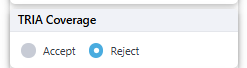
You can choose to Accept or Reject the Terrorism Risk Insurance Act (TRIA) coverage using the right-hand panel. Simply select the appropriate radio button:
-
Accept
-
Reject
Form Requirements Based on Your Selection
✅ If you Accept TRIA Coverage:
Make sure the following forms are selected under Common Forms:
General Liability:
-
CG 21 84
-
IL 09 85
Property:
-
IL 09 86
-
IL 09 85
❌ If you Reject TRIA Coverage:
Ensure these forms are selected under Common Forms:
General Liability:
-
GL CG 21 73
Property:
-
IL 09 53
Important Notes:
-
If you've added any TRIA-related forms manually using the Form Search, remove them.
-
Then, refresh the Quote or Binder to automatically populate the correct forms in the Common Forms section.
TRIA Disclosure Form (ASIC-NOT-0004):
This form includes only the estimated premium.
It will not be pre-filled with any other details.
To change TRIA during a policy term, follow the steps below to process an endorsement:
1. Retrieve the account and select the 'Endorse' button to generate an Endorsement
2. Enter an Endorsement Effective Date into the Endorse Panel and click the 'Generate Endorsement Number and Proceed' button
3. Select the option to Accept or Reject TRIA on the right-hand side
4. Scroll down to the Policy Services/Endorsement panel and click the 'Calculate Premium' button

5. Confirm the Endorsement Details (Wording & Premium Change) and then click the Preview Endorsement button to review the changes.
6. Once you have confirmed the details, select the Complete/Issue Endorsement button to finalize the changes.

