


 7
7
Wind & Hail Deductible – How to Complete This Section
This section allows you to choose how your Wind & Hail deductible is applied. You can enter either a fixed deductible amount or a percentage with a minimum amount — but not both.
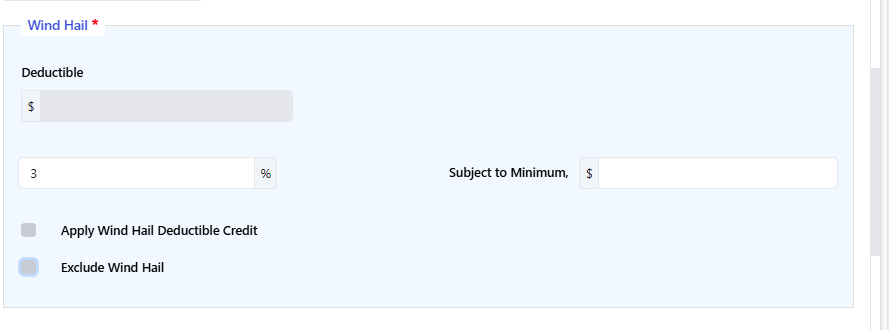
If the Exclude Wind Hail option is selected, then the Deductible section will not display, and form CP 10 54 Windstorm or Hail Exclusion will be applied.
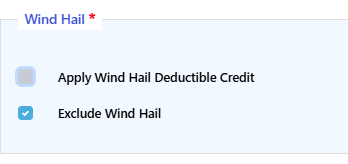
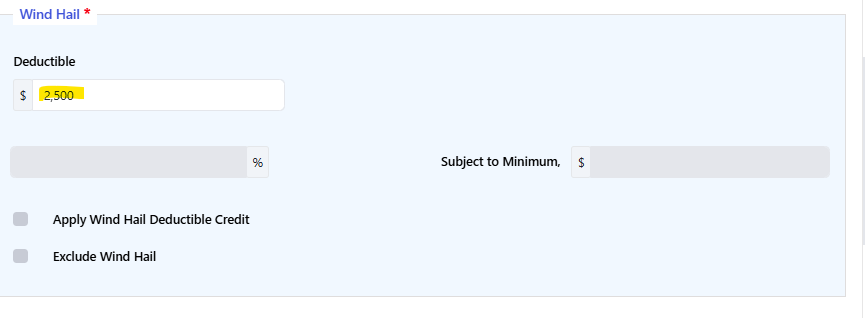
Option 1: Enter a Wind & Hail Deductible Amount
Choose this option if you want to enter a fixed dollar amount.
Steps:
-
Make sure “Exclude Wind Hail” is unchecked.
-
If there are values in the Percentage or Subject to Minimum Amount fields, delete them.
-
Enter your desired deductible in the Amount field.
Note: The Amount field will only be available when the Percentage and Subject to Minimum fields are blank.
If a deductible is applied them form ASIC-PR-0011 Wind or Hail Deductible will be applied.
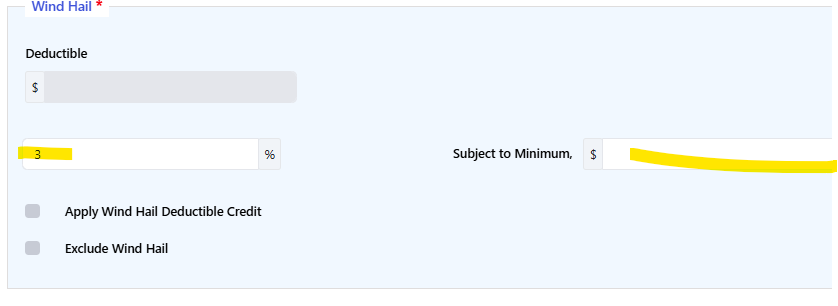
Option 2: Enter a Wind & Hail Percentage and Minimum Amount
Choose this option if you want the deductible calculated as a percentage, with a minimum dollar amount.
Steps:
-
Make sure “Exclude Wind Hail” is unchecked.
-
If there is a value in the Deductible Amount field, delete it.
-
Enter:
-
A value in the Percentage field
-
A value in the Subject to Minimum Amount field
-
Note: These fields will only be available when the Deductible Amount field is blank.
If a deductible is applied them form ASIC-PR-0011 Wind or Hail Deductible will be applied.
How Wind & Hail Affects Your Premium
Premium calculations are controlled by the “Apply Wind Hail Deductible Credit” option — not by the “Exclude Wind Hail” setting.
-
If “Apply Wind Hail Deductible Credit” is unchecked:
The system calculates a set total for the Building Coverage premium (no credit applied). -
If “Apply Wind Hail Deductible Credit” is checked:
The system applies a credit (discount), which will typically lower the Building Coverage premium.
Important Reminders
-
You must choose either a deductible amount or a percentage with minimum — not both.
-
“Exclude Wind Hail” must remain unchecked to enter deductible details.
-
The premium discount is controlled by “Apply Wind Hail Deductible Credit.”
If you’re unsure which option to select, contact Underwriting.
If you encounter any system issues, contact [email protected]

